Boombox visual audio mixing& extensive sfx library



Trusted worldwide in production workflows





45 packs & counting.
2,000+ searchable tags.
15,000+ sound effects.
Listen to all packs
The Library
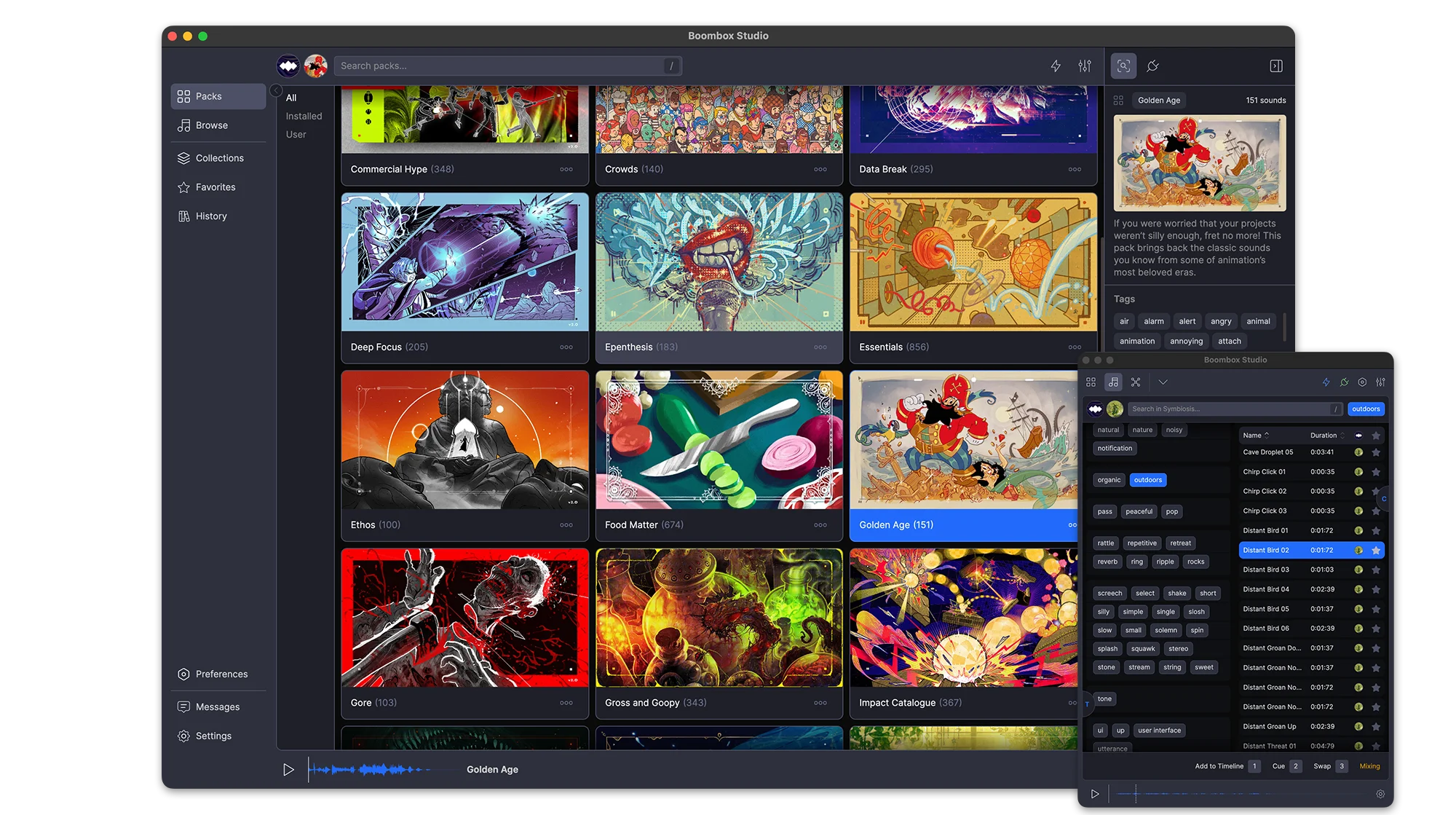
45 packs, 15,000+ sounds, 2,000+ tags, and every one of them plays before you download a thing. Sounds stream on demand, so you can audition the whole library first and only download the packs you keep.
Favorites
Favorite a sound from a pack, a search or your own imports and it collects in Favorites. One toggle shows only the starred ones.
Stream or Download
All 45 packs are playable the moment you open the app. Sounds stream on demand, so you can audition the entire library before downloading anything. Download the packs you keep and they play offline.
Search
One field searches sound names, packs and tags at once. Every result carries its pack, duration and full tag list
Stream or Download
All 45 packs are playable the moment you open the app. Sounds stream on demand, so you can audition the entire library before downloading anything. Download the packs you keep and they play offline.
Search
One field searches sound names, packs and tags at once. Every result carries its pack, duration and full tag list
Tags
Pick a tag and the panel narrows to the tags that still appear alongside it, so you are able to find SFX for anything
Filters
Narrow results by pack, by duration, or to favorites only. History filters by date instead.
Tabs
Search several packs at once. Each search keeps its own tab, named after what you searched for and holding its own filters and selection.
Packs
Every pack is produced and mixed by our award-winning composer, with its own (human-made) artwork, description, sound count and total runtime. New packs arrive regularly and sync in the background.
Favorites
Favorite a sound from a pack, a search or your own imports and it collects in Favorites. One toggle shows only the starred ones.
One-click Sync
Every sound carries a hand-picked Cue Point™ marking its impact. Add drops a sound at your playhead with the cue on that frame. Swap replaces a clip where it sits. Cue layers another sound onto the same moment. Set an Auto-Mix range and nothing lands at 0 dB dead center.
Auto-Mix
Set a volume and pan range once and everything you place lands inside it. Each parameter has its own switch, so you can randomize pan and leave volume alone.
Add
Every sound carries a hand-picked Cue Point™ marking its impact. Add drops the sound on the next free audio track with that cue landing on your playhead.
Swap
Wrong sound? Select the clip, pick another, hit Swap. The clip is replaced where it sits with its Cue Point™ on the same frame. No re-trimming, no nudging.
Add
Every sound carries a hand-picked Cue Point™ marking its impact. Add drops the sound on the next free audio track with that cue landing on your playhead.
Swap
Wrong sound? Select the clip, pick another, hit Swap. The clip is replaced where it sits with its Cue Point™ on the same frame. No re-trimming, no nudging.
Cue
Cue layers another sound onto a new track, aligned to the same Cue Point™ as the clip you have selected.
Auto-Mix
Set a volume and pan range once and everything you place lands inside it. Each parameter has its own switch, so you can randomize pan and leave volume alone.
Mixing
Every sound in your comp is a point in a dome, where distance from the center is volume and angle is pan. Drag a point and the clip on your timeline follows.
Audio Skins
Turn on Audio Skins and the selected sound draws lines to the ones before and after it, with arrows showing which way the mix is moving.
Constellation™
Your whole project becomes a constellation. Every sound takes a place in the field, and mixing is a matter of moving through that space until everything sits where it should.
The Project List
Every sound you’ve placed, with its volume on a slider and its pan on a knob, reading out in dB and degrees. Sort by any column, search within the comp, and select rows to mix them as a group.
Constellation™
Your whole project becomes a constellation. Every sound takes a place in the field, and mixing is a matter of moving through that space until everything sits where it should.
The Project List
Every sound you’ve placed, with its volume on a slider and its pan on a knob, reading out in dB and degrees. Sort by any column, search within the comp, and select rows to mix them as a group.
Auto-Mix & Distribute
Select the sounds, set a volume and pan range, and preview it as a wedge on the dome before you commit. Auto-Mix randomizes inside the range; Distribute spreads the selection evenly across it.
Audio Skins
Turn on Audio Skins and the selected sound draws lines to the ones before and after it, with arrows showing which way the mix is moving.
Thousands of searchable tags.
Your Packs
The 15,000 sounds are ours. Everything else is yours: import a folder of your own audio, tag and rename it inline, build packs for a project, and export one to hand to whoever is finishing the job.
History
Every sound you Add, Cue or Swap is written to History with the date it was used.
Import a Folder
Pick a folder of your own audio and Boombox builds a custom pack out of it, sitting alongside the 45 that ship with the app.
Export Packs
Any pack you build exports as a single file and imports again anywhere, tags and Cue Points™ intact.
Import a Folder
Pick a folder of your own audio and Boombox builds a custom pack out of it, sitting alongside the 45 that ship with the app.
Export Packs
Any pack you build exports as a single file and imports again anywhere, tags and Cue Points™ intact.
Favorites
Favorite the sounds you keep coming back to and find them again in the Favorites tab.
History
Every sound you Add, Cue or Swap is written to History with the date it was used.
Fits Your Setup
Boombox connects to After Effects, Premiere Pro, Audition and DaVinci Resolve, full-size beside your edit or docked as a narrow plugin panel. Preview volume matches After Effects dB exactly, and switching sounds no longer pops.
Preferences
A complete set of preferences and settings to customize Boombox to the way you work.
Plugin Mode
Run Boombox full-size beside your edit, or shrink it to a single column that fits a plugin dock. Toggle the tag panel and the Duration, Pack and Favorite columns, scale the UI, or drag a sound straight onto the timeline.
Preferences
A complete set of preferences and settings to customize Boombox to the way you work.
Plugin Mode
Run Boombox full-size beside your edit, or shrink it to a single column that fits a plugin dock. Toggle the tag panel and the Duration, Pack and Favorite columns, scale the UI, or drag a sound straight onto the timeline.
Preferences
A complete set of preferences and settings to customize Boombox to the way you work.
Users say
“Boombox is always coming in clutch with the sfx to make the reaction from people seeing the animations from "nice" to "damn!!!" It helps add life to an animation and push it to the next level.”
Tsuriel.co
“Boombox helps me a lot to be faster and delivery videos to my customers”
@coleta1994
“For a quick sound effect pass Boombox has been a life saver!”
Chris Lupton
“The best after effects plugin for adding sound in the world”
Alex iji
“I've been using Boombox for years now and it makes creating videos a lot easier than before. My videos are now much more engaging and people love them!”
@O's Fun Planet
“Boombox is a Boom in a Box”
Mika @ VeryVertical
“BoomBox has quickly become my favorite way to do sound design. I love the selection of sounds and how they are organized in a way that makes sense for motion designers like me. I rarely have to open other libraries these days!”
Timo @ Flying Colors
“I use a boombox for all of my work because it feels easy and not having to switch back and forth makes it faster. Worth the money spent”
dudy
“Boombox is one of those tools that makes a project so much more manageable. You know those times, when you're under deadline crunch and you need sound design NOW? Mt. Mograph has your back. It's saved me from the endless depths of internet searches so many times and is a huge value for the amount of free packs the team keeps putting out. Can't recommend it enough!”
Scott Fischer - Freelance Motion & Design (You can abbreviate if you prefer!)
“Boombox is essential for fast paced production environments. It gives instant access to an incredible library of useful sounds to enhance your work.”
Zach - Exposure Video
“Boombox is an incredible diverse library that will have you covered for 99% of sounds you ever need. They sounds are pretagged and in libraries that make esnes and the sounds are top notch. I use this plugin more than anything in AE. SO good and at that price i am so thankful for Mt mograph and Boombox.”
Ben H
“Boombax changed the way I search and find sfxs. Without any doubt the most complete and easy Sfx Library out there!”
Valerio Galli @ Big Productions
“Once I got boombox I now cant go back. I used to comb through freesound.org and now its a quick search and import”
Steve
“Boombox makes adding SFX fun and the ability to explore sounds so easily lets your creativity roam in the editor.”
Billy Wood
“I use Boombox literally every time i open After Effects or Premiere. This plugin was a bless to my workflow and SFX needs. I can't recommend it enough.”
Nicolas Chidem
“I love using Boombox. It's so convenient to have a large sound effects library right in Premiere. So easy to find and add sound effects for all of my projects.”
Kit Sinclair - Freelance Motion Designer
“I use Boombox on every project! Commercial, Fiction and Non-Fiction. The quality of the sound makes me a better editor and having everything right there on the software, while also copying the files to my project folders, makes the process easier and faster!”
Luisa Piña
“Boombox is a great tool to begin experimenting with sound design in your projects. As a TV show director, foley is a major piece of the puzzle I use to add texture and depth.”
Jon Walker, Producer/Director - Powernation Studios
“Boombox facilitated me to do the sound mix for my animation projects with much ease, the best thing is that I don't have to leave After Effects to do so, highly recommended.”
Muhammad@ifaisalstudio
“Boombox is without a doubt the easiest way to add sound effects to your project. Period.”
Erik at Momotion
“Boombox is an absolutely essential part of my sound design process. Well stocked with a wide variety of sounds, intuitive controls and speedy as all get out. Boombox is the mic drop of audio.”
Josh Makes Motion
“Boombox is an incredibly handy tool to have, and with its wide variety of sound packs, I've always been able to find what I needed.”
pprmint.
“Boombox is a amazing way to search for SFX right in AE and line it up straight away without hassle.”
“I used to store a bunch of sound effects in random folders on my computer, and searching for things was a nightmare, and it made sound design extremely tedious. Then I became enlightened and started using Boombox. I can now whip through sound design in a fraction of the speed, I get the very rare but oh-so-welcome "client note" on the sound design where it's actually just a compliment, and the overall process is now quite enjoyable!”
Casey at Peer Through Media
“Boombox is great extension that is a big step toward solving a tedious problem in motion design.”
Taylor Northrup Loyd